Followers of the Company Page return!

Company Pages have been being added to with great frequency over the past few months as LinkedIn has been breathing additional life into them – as well as changing their names to just Pages. The menu we see on the main page has had items added to it with an almost frightening frequency, and there is still more to come with the ‘Products’ page that currently appears on LinkedIn’s own Company Page being an indicator of the return of an old favourite.

However, one past favourite that remained absent was the ability to see who it was who was following our Company Pages and this was something that rankled badly with admins who were spending time and effort building the audiences on their pages and yet being handicapped by not actually knowing who it was who was doing the following!

This finally has been rectified with the return this week of the full details regarding Company Page followers.

Follower Analytics Available

During its absence – it disappeared around February 2019 – LinkedIn has been gradually beefing up the admin area of the Company Pages and the analytics area in particular. It was, however, in the most part at a macro level with the ability to see numbers by a variety of general categorisations such as Continue reading

Article Categories: Businesses using LinkedIn, Company Pages, LinkedIn Company Pages, LinkedIn Marketing
Article Tags: , , , , ,

Increase in LinkedIn’s Headline Field

Short but very sweet today! LinkedIn has decided to increase the number of characters that you can use in the headline field on your Profile today – something which came rather out of the blue!.
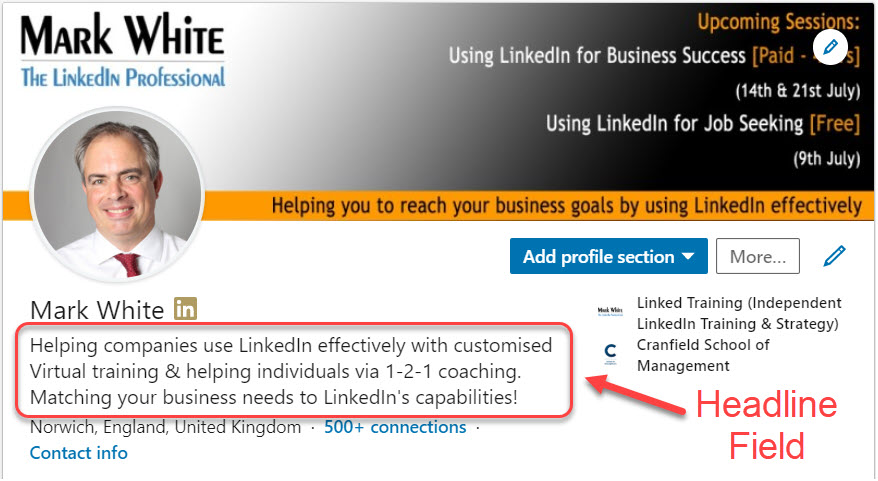
The Headline field is one of the most important areas on your LinkedIn Profile page, partly because it is quite restrictive but also because the role that it plays. In case you’re wondering, the Headline consists of the characters that appear just below your photo at the top of your profile:

For as long as I can remember, the limit to this section was 120 characters – it was always designed to be something which was short and to the point.

However, as of today LinkedIn has increased that limit to 220 characters so you can if you wish add in a whole lot more information into this area.

However, before the cheers subside, a word of warning. I’m not convinced that you should. Continue reading

Article Categories: LinkedIn Site Changes, New LinkedIn Profile, Optimise your Profile
Article Tags: , , ,

Job Search Series – Be in the Background!

A question for you. Next time you visit someone’s Profile, check where your eyes focus first?

Generally, we start looking at things from the top left so it might well be the photo. However, if it has been done well, then you normally find that it’s the background image – the banner that sits right across the top of the Profile.

This is essentially YOUR SHOP WINDOW if you like and what you put in there sets the tone for the rest of your profile as well as gives .

This area is critical to the 1st impression you give to anyone visiting your profile – and you know what they say about 1st impressions!

Needless to say, leaving it as the default blue image is wasting a massive opportunity.

Instead what can you do with it?

Ideally use something that sets you apart from other profiles. We need to stand out – lots of competition vying for attention, so let’s use all the tools available! Continue reading

Article Categories: Job Search Series, Job Seeking, Searching for Jobs
Article Tags: , , , ,

Job Search Series – Think like a Recruiter

Today, let’s start with a key fundamental – if you are using LinkedIn for a Job Search then you need to appeal to the people who are going to be looking for you like an attorney recruiter, whether these are people who work in a Recruitment agency or at the organization that is looking to hire you. Keep in mind also that most companies are doing some kind of assessment like the ones from this site https://wonderlic.com/wonscore/ to understand if a candidate like you can do the job.

So, as you create your profile or decide what you want to post or contribute to, you have to put yourself in their shoes – You have to think like a Recruiter!

When I run LinkedIn sales and marketing training sessions, I talk about your “Audience” – in other words, who do you want to sit up and take notice of YOU! In that case, it is talking about who would be your Buyer Persona or who would be the prospect that you want to talk to.

When it comes to job search, the same applies, but clearly the audience has changed. We now need Recruiters to find us and then be interested in us! Keep on reading and find here great information for your job search. Continue reading

Article Categories: Job Search Series, Job Seeking, Searching for Jobs
Article Tags: , , , ,

New factor in LinkedIn’s Algorithm – Dwell time

There’s a new kid on the block when it comes to the LinkedIn algorithm & how it decides if your posts should feature in other people’s newsfeed – Dwell Time.

You’re probably aware that LinkedIn uses people’s reactions to your posts (leaving ‘like’ or ‘comment’) to decide if they distribute it further & give it additional airtime.

Well, a new factor at play also looks at how long people spend looking at the content as well – the Dwell Time. The longer people spend reading it the better – for you & the algorithm.

So hopefully this increases quality of content over time yet still rewards engagement. Continue reading

Article Categories: Content Marketing, LinkedIn Site Changes, LinkedIn Tips
Article Tags: , , , ,

6 ways to use LinkedIn as a Job seeker

Job Seeker on LinkedInI have been lucky enough to work with a number of Jobs Clubs and Careers / Outplacement teams in my role as a LinkedIn trainer and consultant, and met a lot of great people who have gone on to really explore LinkedIn as a powerful ally in their own Job search.

In the sessions I’ve run, we try to cover a range of opportunities that LinkedIn offers rather than focus solely on, say, the profile or the Jobs area – there are so many additional tools that we can tap into and I guess many different ways that we can go about the process of looking for a new job. The areas that we cover therefore include making the most of the Personal Profile space that we have on LinkedIn (to attract and then inform), active searching and connecting with relevant people, marketing and positioning yourself to maintain visibility, as well as using the Job Board to keep an eye out for potential roles.

Above all it’s another tool in the Job Seeker’s arsenal and one that is particularly valuable when it comes to the proactive job searching, particularly those 70% of jobs that allegedly are never actually advertised externally. Getting in front of the right people

So, what areas do we need to consider Continue reading

Article Categories: Jobseekers using LinkedIn, LinkedIn Strategy, Using LinkedIn
Article Tags: