


Call Mark on:
020 3633 0230or email your enquiry to:
mark@linkedintraining.netDelivering quality training,
consultancy & coaching
on LinkedIn since 2009LinkedIn Training
Come and connect!


Please follow us on LinkedIn
Recent In-House Training
- LinkedIn for ReferralsInternational Insurance Company
- LinkedIn for Sales & MarketingBirmingham (Manufacturer)
- LinkedIn for Recruitment AgenciesEdinburgh (Recruiter)
-
LinkedIn Introduction TrainingLondon (Business Group)
- LinkedIn for Business DevelopmentRemote Delivery (Engineering Company)
For costs and availability,
call on 020 3633 0230 or
email mark@linkedintraining.net-
Latest Articles
LinkedIn Topics
- A to Z of LinkedIn
- Advanced LinkedIn
- Advertising on LinkedIn
- B2B Advice for LinkedIn
- Business Development on LinkedIn
- Businesses using LinkedIn
- Company Pages
- Content Marketing
- Groups on LinkedIn
- Job Search Series
- Job Seeking
- Jobseekers using LinkedIn
- LinkedIn Advice
- LinkedIn Applications
- LinkedIn Company Pages
- LinkedIn Course
- LinkedIn for Recruitment Agencies
- LinkedIn Marketing
- LinkedIn Mobile
- LinkedIn News
- LinkedIn Publisher
- LinkedIn Sales Navigator
- LinkedIn Search
- LinkedIn Site Changes
- LinkedIn Strategy
- LinkedIn Tips
- LinkedIn Training
- LinkedIn Updates
- LinkedIn Workshop
- Networking supercharged
- New LinkedIn Profile
- Optimise your Profile
- Q & A on LinkedIn
- Sales Navigator
- Searching for Jobs
- Security on LinkedIn
- Showcase Pages
- Social Media
- Social media Week
- Social Selling
- Twitter + Linkedin
- Uncategorized
- Using LinkedIn
Category Archives: Optimise your Profile
Who do you want to notice you on LinkedIn?
 Don’t try to create a LinkedIn Profile that speaks to everyone. You can’t.
As Lincoln is famously quoted as saying “You can’t please all of the people all of the time”.
The same most certainly rings true when it comes to your Profile as well – write it to try to talk to everyone and you’ll end up talking to no-one.
So, it’s really important to decide who is your target audience when writing it. (more…)

| Article Categories: | Advanced LinkedIn, B2B Advice for LinkedIn, Job Seeking, Optimise your Profile, Using LinkedIn |
| Article Tags: | Editing your LinkedIn Profile, Linkedin Profile, LinkedIn Profile Optimisation, LinkedIn Profiles |
B is for Banner: A to Z of LinkedIn
 “A picture is worth 1000 words” – ring a bell? Well, we all have a piece of prime real estate at the top of our Personal Profile that is the ideal place to make the most of exactly that.
You may recognise the grey / green looking image that I’ve added below as the default background or banner that still introduces so many profiles …. what a waste!
What does your say about you or what you offer?
With a little bit of work (or a visit to somewhere like canva.com), we have the opportunity to create something that gives a very powerful visual message to introduce the rest of your profile.
In fact the banner makes up about 40% of what LinkedIn calls the “Introduction Card” – that top part of your profile also containing (more…)
| Article Categories: | A to Z of LinkedIn, Optimise your Profile |
| Article Tags: | AtoZ LinkedIn, Editing your LinkedIn Profile, LinkedIn background, LinkedIn Banner, Linkedin Profile, LinkedIn Profile Optimisation |
Don’t make your employees into stormtroopers
 A long time ago, in a company far far away …
Well, without wishing to spoil a good story, scarily it was actually last month.
I was speaking to a company about using LinkedIn as a business development tool. No surprise there.
I’d mapped out a training plan for them and, as is my preference, the 1st session included how they presented themselves on the site – their Professional branding – particularly the sales team.
That’s all covered I was reassured.
Super! But I thought I’d check anyway.
First one was okay, a couple of pieces missing but generally not too bad.
The second one looked strangely familiar. (more…)
| Article Categories: | B2B Advice for LinkedIn, Optimise your Profile, Social Selling |
| Article Tags: | Company Marketing, LinkedIn for Business, Linkedin Profile, LinkedIn Profiles |
Increase in LinkedIn’s Headline Field
 Short but very sweet today! LinkedIn has decided to increase the number of characters that you can use in the headline field on your Profile today – something which came rather out of the blue!.
The Headline field is one of the most important areas on your LinkedIn Profile page, partly because it is quite restrictive but also because the role that it plays. In case you’re wondering, the Headline consists of the characters that appear just below your photo at the top of your profile:
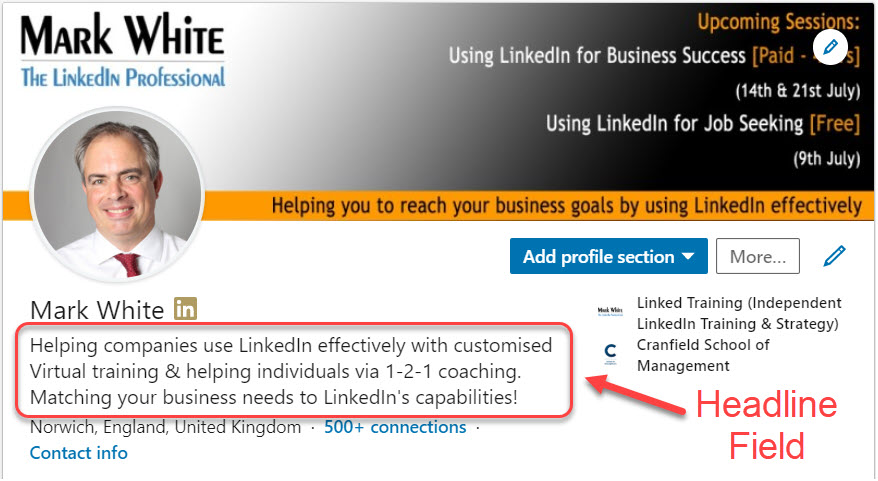
For as long as I can remember, the limit to this section was 120 characters – it was always designed to be something which was short and to the point.
However, as of today LinkedIn has increased that limit to 220 characters so you can if you wish add in a whole lot more information into this area.
However, before the cheers subside, a word of warning. I’m not convinced that you should. (more…)
| Article Categories: | LinkedIn Site Changes, New LinkedIn Profile, Optimise your Profile |
| Article Tags: | Changes to LinkedIn, Linkedin Profile, LinkedIn Profiles, LinkedIn site updates |
Featured section – new on LinkedIn!
Over the last 6 weeks, LinkedIn has been rolling out a new feature which can make a massive difference to our Personal profile pages because of the opportunities it offers to highlight key aspects of our content or news that might otherwise remain buried among the myriad of information we have on it. Ideal whatever our reason for being on LinkedIn is.
I’ve long talked about the benefits of certain key aspects of our profile – the headline to deliver a first “statement of benefits”, the banner to convey visually the message you wish to get across and the About section which gives you the scope to speak effectively about what you can bring to any conversation / relationship on LinkedIn.
Joining the party is the Featured section which sits again in the top part of the profile and allows you to highlight your work, articles, posts or other resources that you feel best represent you and show off your offerings.
What is it?
The Featured section appears at the top of your profile and as you can see, at the time of writing, it does live up to its name. What you put in there is definitely going to be featured as LinkedIn hasn’t skimped on the size of the section! (more…)
| Article Categories: | Advanced LinkedIn, LinkedIn Site Changes, LinkedIn Updates, Optimise your Profile |
| Article Tags: | Changes to LinkedIn, LinkedIn Featured section, LinkedIn Marketing, Linkedin Profile, LinkedIn Profile Optimisation |
H is for Headline: A to Z of LinkedIn
 The headline is an important part of your profile on LinkedIn, it plays a greater role than simply an introduction on your profile page … though it does that well too! It is in reality a key element of the whole introduction process, a text bill board to complement the graphic banner and a way to engage with others.
To clarify what I’m talking about – if you look at your Profile Page, the Headline is the piece of text that sits under your photo on the left hand side and which probably contains your Job Title and Company name if you haven’t changed it. It is also probably the first piece of text on your profile that people see when they visit it.
As it happens, you now have 220 characters at your disposal to play with here (as of June 2020). Whether you should use them all or not, I look at in Increase in LinkedIn’s Headline Field post.You essentially have free rein to use it as you see fit – it doesn’t effect the job title you display in the “Work Experience” section but does allow you to use this area in a different way.
To do so click on (more…)